Waymo
- 4.9
- Rating
- 1.00M
- Installs
- Free
- Price

 Analysis by App-foxy
Waymo is a free Maps & Navigation app from Waymo LLC, but it is not simply another tool for drawing a route on a screen. Its central purpose is to let people arrange and use rides handled by the Waymo Driver, an autonomous driving system. That difference changes what I look for when reviewing it: the important question is not only whether the map is clear, but whether the whole process of requesting, meeting, and completing a ride feels understandable.
After trying to think through the app as a daily travel tool, I see its strongest appeal in one specific capability: requesting an autonomous ride from a phone and following the trip through the same service. That can remove several ordinary driving tasks at once. I do not have to hold a steering wheel, search for parking, or spend the journey watching traffic. At the same time, this is not a universal replacement for every navigation app or every transport option. Its value depends heavily on where the Waymo service is available and whether the destination fits the service area.
What the autonomous ride capability changes
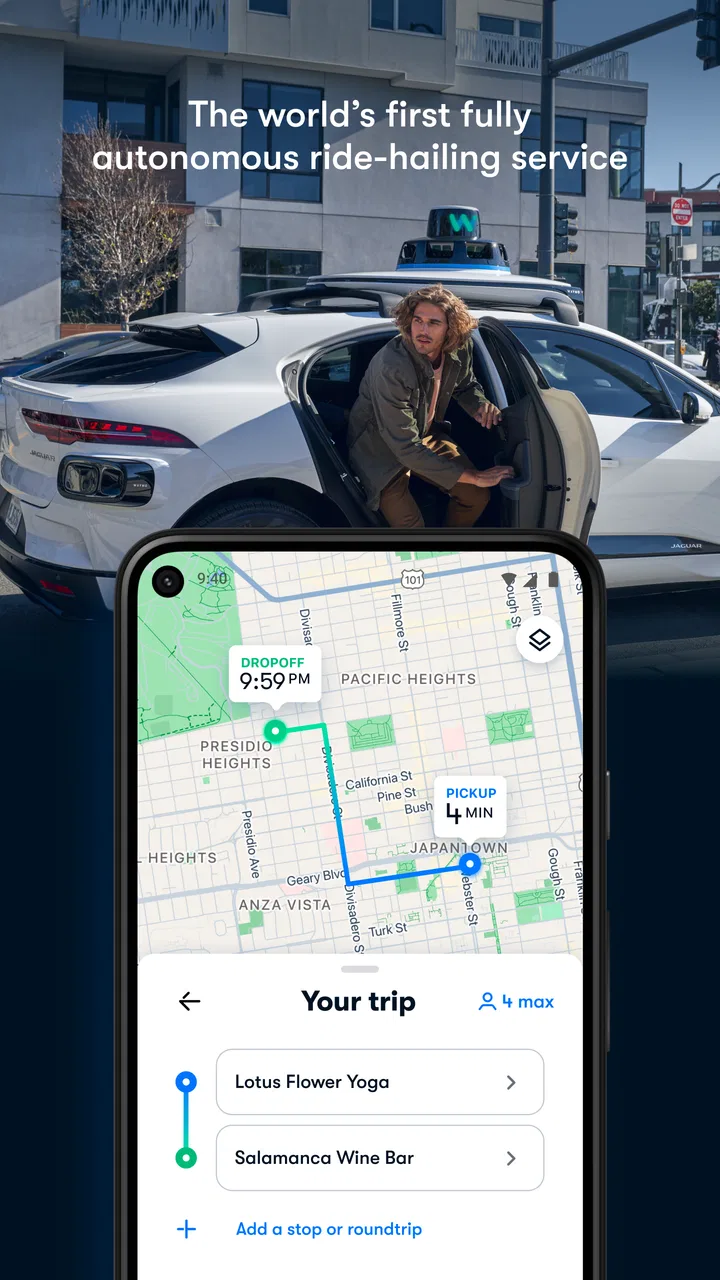
The most meaningful feature is the handoff between the passenger and the vehicle. With a conventional map app, I usually receive directions and remain responsible for getting there. With Waymo, the app is part of a ride-request experience: I use it to arrange the trip, identify the pickup, and stay informed while the vehicle is involved. That makes the app feel closer to a transport service than to a traditional map.
You May Also Like

 Blood Strike: 2.5 Anniversary
Blood Strike’s Loadouts Turn Every Drop Into a Tactical Gamble
A close look at Blood Strike’s custom loadouts: how fast access to signature weapons reshapes its battle royale rhythm, rewards preparation, and narrows the gap between fights.

 Pandora - Music & Podcasts
Pandora’s Music Is Easy to Start, but Harder to Recover
Pandora’s strength is its low-effort path from a seed to a station. Its weak spot is how much confidence it asks you to place in connection, setup, and quiet recovery.

 8 Ball Pool
 Is Built on Rivalries, Rematches, and Routine
A close look at the rivalries, rematches, shared routines, and unanswered safety questions that turn a quick pool match into a persistent mobile community.

 Samsung Music
’s Quiet Strength Is Playing What You Already Own
Its reach comes less from spectacle than from dependable access to a personal library. That simplicity is both the app’s strongest retention engine and its ceiling.

 AccuWeather: Weather Radar
AccuWeather Review: A Quick, Clear Forecast for Everyday Decisions
For everyday plans, the best forecast is the one you can understand quickly. AccuWeather makes rain timing, radar, and local conditions easy to act on, with a few trade-offs.

 Hill Climb Racing
Why Hill Climb Racing Still Turns Crashes Into One More Run
A tiny car, a bumpy hill and one more upgrade: Hill Climb Racing keeps resurfacing because its simple chaos makes every near-miss feel personal.
More From Our News Desk



In practical terms, the benefit is time that can be used differently. I can read, answer messages, prepare for a meeting, or simply sit without concentrating on lanes and intersections. The autonomous system is the reason this experience exists, while the app provides the passenger-facing control layer. That division is important because a smooth ride still depends on a clear pickup process and a destination entered correctly.
I also appreciate that the app is aimed at an ordinary passenger rather than someone who wants to study autonomous-vehicle technology. The store listing presents it as a Maps & Navigation app, and the age rating is Everyone, which reflects a broad, everyday audience. The wording is simple, but the underlying use case is unusual: I am not merely asking a phone to tell me where to turn; I am asking it to coordinate a ride in which the vehicle handles the driving.
The public response is a useful sign of how widely people have accepted that idea. Waymo has an average rating of 4.9 from around 42 thousand ratings, with roughly 3.5 thousand written reviews, and the app has passed a million installs. Those figures do not guarantee that every ride will suit every passenger, but they suggest that the basic experience has made sense to a substantial user base.
How I would use it before leaving
I would begin by treating the pickup point as seriously as the destination. In a normal taxi or rideshare app, I might place a pin near a busy entrance and expect the driver to call or adjust. With an autonomous ride, the meeting location deserves more attention because there is no conventional driver to negotiate a last-second change in person. Before requesting a ride, I would check the exact street side, nearby entrances, and whether I can safely wait there.
That small habit is one of the less obvious lessons of this kind of service. The app can make the request feel effortless, but the passenger still has responsibility for being in the right place. A hotel lobby, a large shopping complex, or a divided road can create confusion even when the address itself is correct. I would rather spend a moment checking the pickup details than assume the vehicle can find me wherever I happen to be standing.
The same applies to the destination. If I am going to a building with several entrances, I would choose the point that best matches the final part of my walk, not just the building name. A map can guide the vehicle to an address, but I still need to think like a pedestrian once the ride ends. This is especially useful for appointments, where arriving at the correct side of a campus or complex matters more than simply reaching its general street address.
Waymo’s current version is listed as 26021605.875939243-release, and it supports Android from version 8.0 onward. For an Android user, that makes compatibility fairly broad, although the practical experience will still depend on the phone, location services, connectivity, and the local availability of the service. I would check those basics before relying on it for an important appointment rather than discovering a problem at the curb.
What the ride feels like in practice
The key difference from a human-driven rideshare is the passenger’s relationship with the vehicle. I am not waiting for a driver to confirm that they see me, and I am not having a conversation about which route seems best. Instead, I need to follow the app’s instructions, approach the correct vehicle, and settle in. That can feel pleasantly calm, but it also means I should not treat the app as optional once the ride has been requested.
For a first trip, I would allow extra time around pickup. Not because the service is necessarily difficult, but because unfamiliar routines create friction. I would keep the phone available, watch for the vehicle’s arrival information, and avoid standing somewhere that makes it hard to identify the pickup point. Once inside, I would confirm that the destination shown in the ride matches what I intended before relaxing.
This workflow is particularly useful for someone who dislikes driving in dense areas. I find city driving tiring when it involves repeated lane changes, parking searches, and uncertainty about restricted turns. An autonomous ride moves that mental burden away from me. The gain is not just that I can avoid driving; it is that I can arrive with more attention left for the reason I was travelling.
There is also a psychological adjustment. Some passengers may feel more comfortable with a human driver because they can ask a question immediately or make a casual request. Others may prefer the consistency of a system that does not make conversation necessary. I would place myself between those reactions: I like the quiet and independence, but I would want to understand the in-app process before using it for a high-pressure trip.
The everyday situation where it makes the most sense
My strongest recommendation would be for a planned trip across a busy urban area when parking is inconvenient and I need to use the travel time productively. Imagine leaving for a medical appointment, a work meeting, or an airport-related journey. I can set the destination, reach the pickup area, and use the ride to review notes instead of navigating traffic. The app’s value becomes clear because the journey is not merely about distance; it is about reducing the number of tasks competing for my attention.
A similar case is an evening outing where I do not want to drive home. A conventional map app can show public transport, walking directions, or a route for my own car, while a standard rideshare can provide a human-driven vehicle. Waymo offers a different arrangement for people who want a ride without placing the driving task on another individual. That distinction may appeal to passengers who are curious about autonomous transport or who simply prefer a quieter, more self-contained trip.
I would still plan the final walk. If the destination is a large venue, I would look at the entrance before getting in, especially if I am carrying luggage or meeting someone. This is a practical trade-off: the app can coordinate the vehicle, but it does not remove the need to understand the pedestrian portion of the journey. Thinking about both ends of the trip makes the experience much less stressful.
For regular commuting, the app could be useful when the same service area covers both home and work. Repeated use would make pickup routines easier because I would learn which entrances and waiting spots work best. The first few rides are therefore likely to be more educational than later ones. I would use early trips on days when I had some schedule flexibility, then decide whether it was dependable enough for a strict arrival time.
Where it differs from ordinary map and rideshare apps
Google Maps, Apple Maps, and similar navigation tools are better when I need a broad view of transport choices. They can help me compare walking, cycling, public transit, and driving, while Waymo is centered on its own autonomous ride experience. If I am exploring an unfamiliar region or building a complicated multi-stage itinerary, I would reach for a general map first.
A conventional rideshare app may be more flexible when I need a pickup outside Waymo’s operating area, want a human driver, or need to discuss an unusual situation directly. Human drivers can sometimes adapt through conversation in ways an automated service cannot. On the other hand, the Waymo experience may be more attractive if I want to avoid driver interaction and let the vehicle handle the trip without asking someone else to drive me.
That comparison also explains why I would not install this as my only navigation app. Waymo is specialized. Its strength is not displaying every possible route or helping me navigate while I drive my own car. Its strength is connecting a passenger with a particular autonomous ride service. Keeping a general map app alongside it is sensible for walking directions, public transport planning, and destinations beyond the service’s reach.
The app is free, which lowers the barrier to trying it. However, free installation should not be confused with every ride being free; the app is a way to access the service, not a promise that transportation has no cost. I would review the ride details shown during the booking process and compare the trip with other available options before confirming, especially when price or timing matters more than the novelty of autonomous travel.
The trade-offs I noticed before recommending it
The first limitation is geographic dependence. An autonomous ride app is only useful for trips that its service can actually cover. This is more restrictive than a general map application, which can guide me almost anywhere. Before making Waymo part of a routine, I would test common journeys such as home to work, home to a grocery store, or a regular appointment. If those routes do not fit the available service, the app may remain interesting but not practical.
The second limitation is the need for passenger precision. Pickup and drop-off details matter more than they do when I can simply wave down a taxi or explain a problem to a driver. I would avoid rushing through the request, and I would keep enough battery and connectivity to monitor the ride. These are not dramatic obstacles, but they are the kinds of small responsibilities that determine whether an autonomous trip feels effortless.
The third trade-off is comfort with unfamiliar technology. Some people will find the absence of a human driver liberating; others will find it unsettling. I would not recommend starting with a trip where being late would cause serious consequences. A short, familiar journey is a better introduction because it lets me learn the pickup routine and decide whether I trust the experience before depending on it.
There is also a difference between convenience and control. When I drive, I can change plans instantly, pull over when I choose, or take a route based on a personal preference. With Waymo, I am accepting the service’s operating model. That can be exactly what I want when I am tired of driving, but it is less suitable when I need unusual flexibility or want to make several spontaneous stops.
Who will get the most from Waymo
I think the best audience is people who live or spend time in an area served by Waymo and want a reliable way to turn travel time into personal time. Professionals heading to meetings, visitors avoiding difficult parking, and passengers who prefer not to interact with a driver may all find a clear benefit. The app is also a natural fit for people who are interested in autonomous transport but want to judge it through an ordinary trip rather than a technical demonstration.
Passengers who are nervous about driving in traffic may gain the most emotionally. They can focus on the appointment or activity ahead instead of managing the road. That does not mean the experience will remove every travel worry, since pickup and drop-off still require attention, but it shifts the hardest part of the journey away from the passenger.
I would be more cautious about recommending it to someone who needs a broad travel planner, frequently travels outside the service area, or expects a human driver to accommodate unusual requests. Families and passengers with special luggage needs should also think through the complete journey, including where they will wait and how they will reach the final entrance. The app can be convenient, but convenience is strongest when the trip is straightforward.
For me, the deciding question is simple: do I want a map, or do I want an autonomous ride arranged through a map-based app? If I need the first, a general navigation tool remains the better choice. If I need the second and the route is supported, Waymo offers a distinctive alternative to driving myself or booking a human-driven ride.
My final take after weighing the experience
Waymo succeeds because it focuses on one unusual promise and makes the phone the practical starting point for that promise. The app is free, available to an Everyone audience, and developed by Waymo LLC, but those facts matter less to me than the way it changes the passenger’s role. I am no longer planning a route that I must drive; I am arranging a ride in which the autonomous system does the driving.
I would recommend trying it on a familiar, non-urgent journey first. Check the pickup location, confirm the destination, keep the phone ready, and plan the final walk. Those steps address the main friction points before they become problems. After a few rides, I would know whether the service fits my routine better than a conventional rideshare or a general map app.
My honest view is that Waymo is most valuable when avoiding the driving task matters more than having unlimited route flexibility. It is not a replacement for every navigation tool, and it is not automatically the best option for every passenger. Within its intended use, though, the autonomous ride capability gives the app a clear identity and a practical reason to exist: it lets me spend the journey as a passenger rather than as the person responsible for the road.
FAQs for Waymo
01What is Waymo, and how does it work?
Waymo is an autonomous driving technology company, primarily known for its self-driving car services. The app allows users to book rides in autonomous vehicles, providing a seamless and futuristic travel experience. It operates by using advanced sensors and AI to navigate roads safely, eliminating the need for a human driver.
02Is Waymo available in my area?
Waymo's availability is currently limited to selected regions and cities, primarily in the United States. It's expanding gradually, so it's best to check the app or their official website for updates on service areas. If it's not available now, it might be soon as they continue to grow.
03How safe are Waymo’s self-driving cars?
Safety is a top priority for Waymo. The vehicles are equipped with state-of-the-art technology, including sensors and AI, designed to handle complex driving situations. They've undergone extensive testing over millions of miles. Additionally, the company follows rigorous safety standards to ensure passenger security.
04What should I do if I encounter an issue during my Waymo ride?
If you experience any issues during your ride, Waymo provides customer support through the app. You can report the problem directly, and their support team will assist you promptly. The vehicles are also monitored in real-time, allowing quick intervention if needed.
05How do I book a ride with Waymo, and what are the costs involved?
Booking a ride with Waymo is simple. Download the app, create an account, and enter your pick-up and drop-off locations. Pricing varies based on distance and time, similar to traditional ride-sharing services. Check the app for specific fare estimates before confirming your ride.
Pros
- User-friendly interface for easy navigation.
- High-quality
- realistic driving simulations.
- Regular updates with new features.
- Comprehensive safety features included.
- Supports multiple cities and routes.
Cons
- Limited free version capabilities.
- Requires a stable internet connection.
- High battery consumption in use.
- Occasional GPS accuracy issues.
- In-app purchases can be costly.

Waymo
Gallery